

Instructions for professional invitations
STEP 1: ASSOCIATE YOUR PROFILE
- Access the ticket sales link: https://mostraigualada.koobin.cat/?referer=YGdgYHBicHxzUW5kZmJrc31pdmp5d31zS3xmbXBkfGBLPQ%3D%3D&idioma=EN&act=1
- Log in to "Personal Zone" or "Connect" and set a new password.

- Next, provide the email where you received the email and set a new password. To do this, click on "Forgot your password? Recover."

- You will then receive instructions in your inbox to create a new password.
- Return to the link and enter the new password. Your profile is now associated.
STEP 2: SELECT TICKETS
- Go back to the 'Programmer Invitations' link and register with the same email and address you just configured: https://mostraigualada.koobin.cat/?referer=YGdgYHBicHxzUW5kZmJrc31pdmp5d31zS3xmbXBkfGBLPQ%3D%3D&idioma=EN&act=1
ATTENTION! It is important to access the correct link; otherwise, you won't be able to redeem the code. To ensure you are on the correct link, you should see the text "Programmer Invitations" under the Events tab:

- Enter the shows and sessions you want, select the desired session and day (if there is more than one), and add a maximum of 2 'PRO Invitations.' Then, click the basket icon.
ATTENTION! If you enter a number higher than 2, the system will let you proceed, but it will give you an error in the last step before printing the invitations.

- Click on the 'Add another event' button, and repeat this process for the other shows you want to select.
STEP 3: APPLY THE CODE
- After completing the selection, add the code you received by email and click 'Validate.' You will need to add the code one by one for each show/session.
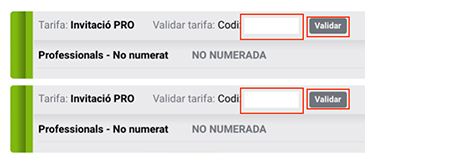
- You don't need to select all the invitations at once. You can repeat the process as many times as you want, as long as you do not exceed 15 double invitations in total.
- Once you have entered and validated all the codes, scroll to the bottom of the page and accept the Terms of Service.

- Next, you can click 'Accept.'

- The tickets will be sent to your email. You can also print them all at once or download them to your mobile devices in Passbook format.
- You can always retrieve your tickets or add more from your Personal Zone.
STEP 4: PURCHASE REDUCED-PRICE TICKETS
- Starting from March 18th, you can purchase up to two tickets at a reduced price for the same shows you requested invitations for.
- To do this, select the shows for which you want one or two discounted tickets (following the previous process) and select the corresponding discount.
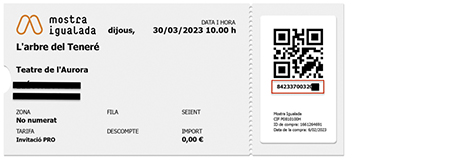
- Next, you will need to validate the discount by providing the barcode number of the invitation.
ATTENTION! This option will not be activated until March 18th. We will send you an informative email.
If you have any questions or issues, please email taquillapro@mostraigualada.cat


